
Download Muchtodo – Voice‑Driven Task Management Tool for Windows, Mac, Android & iOS
Overview
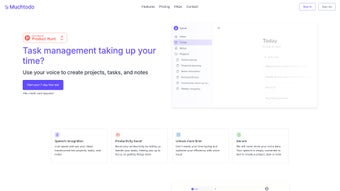
Muchtodo is an AI‑powered task management solution that puts your voice at the center of productivity. Designed for professionals, students, and anyone who juggles multiple projects, Muchtodo transforms spoken ideas into structured tasks, projects, and notes with remarkable speed and accuracy. Unlike traditional to‑do apps that rely on manual typing, Muchtodo leverages advanced speech‑to‑text algorithms to capture thoughts the moment they arise, letting you stay in the flow of work instead of fighting against a keyboard.
The platform supports an impressive 57 languages, making it truly multilingual and ideal for global teams or multilingual households. If you prefer a more conventional approach, Muchtodo also offers a manual entry mode, ensuring that you never feel forced into a single workflow. Privacy is baked into the core of the product: the app does not store any raw voice recordings, processing speech locally or via secure, transient cloud services solely to convert it into text.
This focus on data security gives users confidence that their conversations remain private. A free trial grants full access to the core features, allowing you to test the voice‑driven workflow before deciding on a subscription. Continuous updates improve recognition accuracy, UI polish, and integration options, positioning Muchtodo as a modern, secure, and flexible tool for anyone looking to streamline task creation and boost daily efficiency.
Key Features that Set Muchtodo Apart
- Voice‑First Task Capture: Speak naturally and watch your ideas instantly become tasks, subtasks, or notes.
- 57‑Language Support: From English and Mandarin to Arabic and Swahili, Muchtodo understands a wide range of dialects, making it inclusive for international users.
- Zero Voice‑Data Retention: The app never stores raw audio files, ensuring that your spoken content remains private and secure.
- Hybrid Input Mode: Switch seamlessly between voice and manual entry, giving you full control over how you add information.
- Smart Project Organization: Automatically groups related tasks into projects, applies tags, and suggests due dates based on context.
- Cross‑Platform Sync: Access your tasks on Windows, macOS, Android, and iOS with real‑time synchronization.
- Free Trial & Flexible Pricing: Test the full suite for 14 days, then choose between monthly or annual subscription plans.
- Integration Friendly: Connect with calendars (Google, Outlook), collaboration tools (Slack, Teams), and cloud storage (Dropbox, OneDrive).
- AI‑Enhanced Accuracy: Ongoing machine‑learning updates improve speech recognition and contextual understanding over time.
- Customizable Voice Commands: Define shortcuts like “Create meeting agenda” or “Add grocery item” for rapid task entry.
Installation & Usage Instructions
Step‑by‑Step Installation
Getting started with Muchtodo is straightforward, regardless of whether you’re on a desktop or mobile device.
- Visit the Official Website: Navigate to www.muchtodo.com and click the “Download” button that matches your operating system.
- Windows & macOS: Download the installer (.exe for Windows, .dmg for macOS). Run the file and follow the on‑screen prompts. The installer verifies system requirements, creates a shortcut, and registers the app as a default task manager if you wish.
- Android & iOS: Open the Google Play Store or Apple App Store, search for “Muchtodo”, and tap “Install”. The app will download and install automatically.
- First Launch: Upon opening Muchtodo, you’ll be guided through a brief onboarding wizard. You can grant microphone access, select your preferred language, and choose whether to enable cloud sync.
- Account Creation: Register with an email address or sign in via Google, Apple, or Microsoft accounts. A free trial period is activated instantly.
How to Use Voice Commands Effectively
Once installed, the real power of Muchtodo shines through its voice interface. Here are best‑practice tips to maximize productivity:
- Speak Clearly and Naturally: The AI is trained on diverse accents, but clear enunciation reduces errors, especially in noisy environments.
- Use Structured Phrases: Begin with a command word like “Create”, “Add”, or “Schedule”, followed by the task details. Example: “Create a project called Quarterly Report, add a task to gather sales data, due next Friday.”
- Leverage Contextual Shortcuts: Pre‑defined shortcuts such as “Meeting notes” instantly generate a note template with timestamp and participants fields.
- Review & Edit: After each voice entry, Muchtodo displays a preview. Confirm or edit before saving to ensure accuracy.
- Switch Between Modes: Tap the keyboard icon at any time to switch to manual entry without losing the current draft.
With a few practice sessions, you’ll find that turning thoughts into actionable items takes seconds, freeing mental bandwidth for higher‑order work.
Compatibility, Pros & Cons
Supported Platforms: Windows 10 & later, macOS 10.14+, Android 6.0+, iOS 13+. The app also offers a web‑based dashboard for browsers that support WebRTC, allowing voice capture directly from Chrome, Edge, or Safari.
Pros
- Hands‑free task creation dramatically reduces friction.
- Extensive language support caters to global teams.
- Zero storage of raw voice data enhances privacy.
- Hybrid input model respects user preferences.
- Robust cross‑platform sync keeps data consistent.
- Free trial lets users evaluate without commitment.
- Continuous AI improvements boost accuracy over time.
Cons
- Voice recognition may struggle with heavy background noise.
- Advanced features (integrations, custom shortcuts) require a paid subscription.
- Initial learning curve for optimal command phrasing.
- Desktop version lacks a native tray icon on macOS (requires workaround).
Frequently Asked Questions
Does Muchtodo store any of my voice recordings?
No. Muchtodo processes speech in real‑time and immediately discards the raw audio. Only the transcribed text is saved as a task, note, or project, ensuring your spoken data remains private.
Can I use Muchtodo offline?
Basic voice‑to‑text conversion works offline on desktop platforms after the initial language pack download. However, cloud‑based AI enhancements and cross‑device sync require an internet connection.
Is there a limit to the number of tasks I can create during the free trial?
The free trial is fully unrestricted; you can create unlimited tasks, projects, and notes. The trial simply expires after 14 days, after which you’ll need to select a subscription plan to continue using premium features.
How does Muchtodo handle multilingual input in a single session?
You can switch languages on the fly by saying “Change language to Spanish” (or any supported language). The app updates the recognition model instantly, allowing seamless multilingual task entry without restarting the app.
What integrations are available for Muchtodo?
Muchtodo integrates with Google Calendar, Microsoft Outlook, Slack, Microsoft Teams, Dropbox, OneDrive, and Zapier. These connections let you sync due dates, receive reminders, and automate task creation from other services.
Conclusion & Call to Action
In an era where information overload can paralyze productivity, Muchtodo offers a refreshing, voice‑centric approach to task management. Its ability to capture ideas instantly, support dozens of languages, and keep your data private makes it a standout choice for individuals and teams alike. While background noise and the need for a subscription for advanced features are minor drawbacks, the overall value proposition—especially the hands‑free workflow—far outweighs these concerns. If you’re looking to declutter your to‑do list, reduce typing fatigue, and keep your thoughts organized in real time, Muchtodo is worth a try.
Ready to experience a new way of working? Download Muchtodo now and start your free trial today. Unlock the power of your voice, streamline projects, and stay ahead of deadlines with a tool built for modern, multilingual, and privacy‑focused users.



.png)



